
Real businessOperating Business — Website & Custom CRM
Live Website
Photo booth rental for Central Alabama events, with software built for how it runs.
The website is live and operational. The custom event-operations CRM is built and tested in development; it is not confirmed in production and is not yet live for customers.
01 · Purpose
The Fun Frame is a real photo booth rental business serving Birmingham and Central Alabama. STS built its website, and is building the event-operations system that runs the business behind it.
02 · The problem
Inquiries, quotes, contracts, deposits and event prep were spread across tools that were never designed for a booth business. The owner needed one place that follows an event from first question to the day it happens, and a website that makes the first question easy to ask.
The business it represents. A real photo booth rental business serving Birmingham and Central Alabama. This is a working business, not a fictional demonstration.
Who it serves. People planning weddings, corporate events and parties who want to check a date quickly, and the owner who runs each event from first inquiry to the day itself.
Deployment status
Public website at www.thefunframe.com. Opened anonymously on 2026-11-09 and the page loaded.
The public website is separate from the private event-operations application. The CRM is described only as built and tested in development; it is not confirmed in production and no private screen or record is shown.
Status checked on 2026-11-09. A status is a statement about what was tested that day, not a promise about tomorrow.
03 · Design approach
A dark, theatrical presentation with gold type that feels like an event photo booth: a single warm accent on near-black, a gold-framed hero, and a prominent “Check Your Date” action in the header from every page.
04 · Annotated desktop captures
Real captures of the published site. Numbered points are explained as the camera moves to each one.
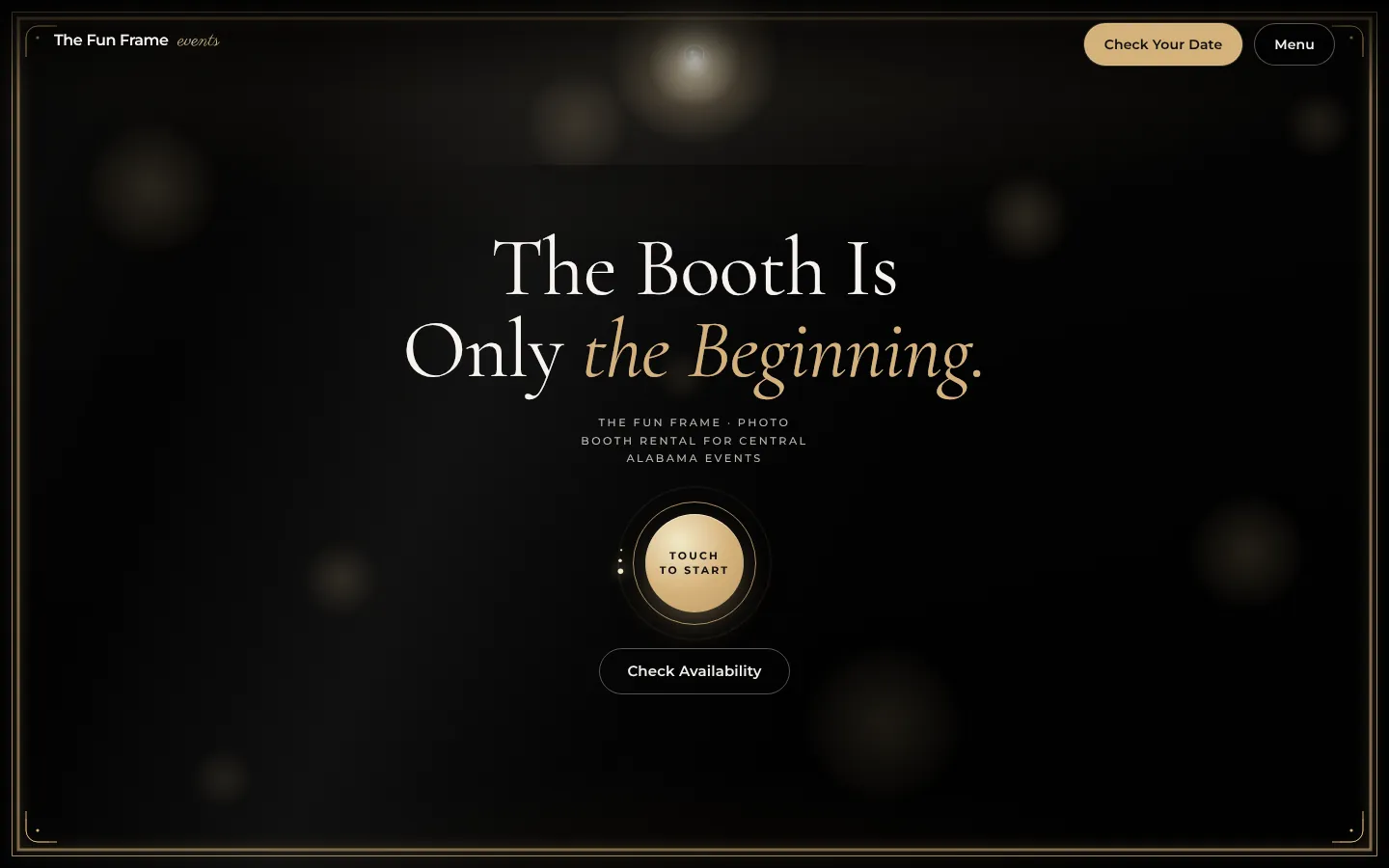
Check Your Date
The first action is always one click away in the header.
One idea, large
A single statement frames the business before any product detail.
Touch to start
A booth-shaped button invites interaction, the way a real booth does.
Check Availability
The conversion path for a host who already knows what they want.
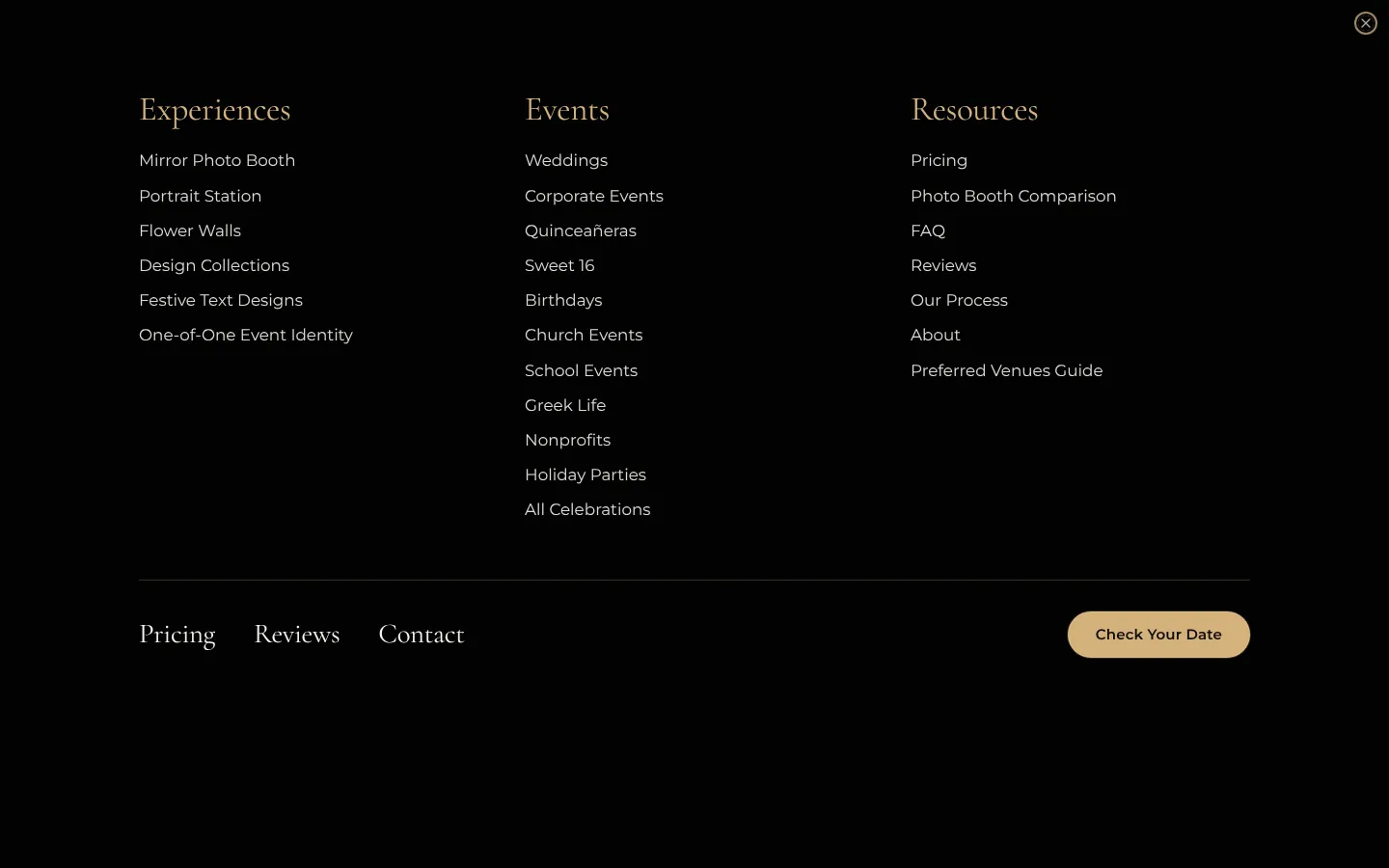
Experiences
The offerings, grouped so a host can compare them.
Events
Organised by occasion, because hosts search by the event they are planning.
Check Your Date
The availability action is repeated inside the menu.
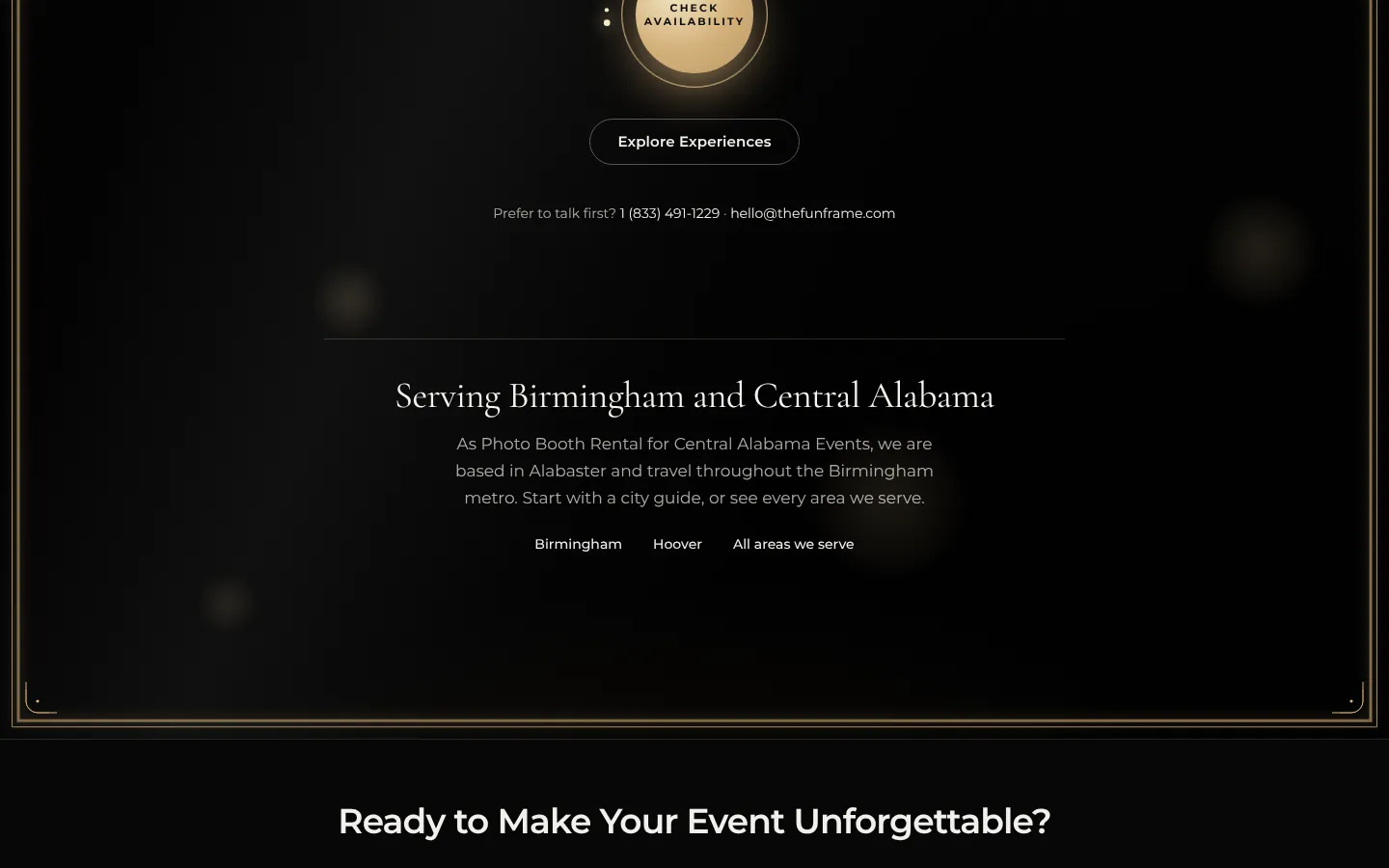
Local by design
States the service area plainly for local search and for hosts.
Final ask
The page ends on the next step, not on a footer.
05 · Responsive behaviour
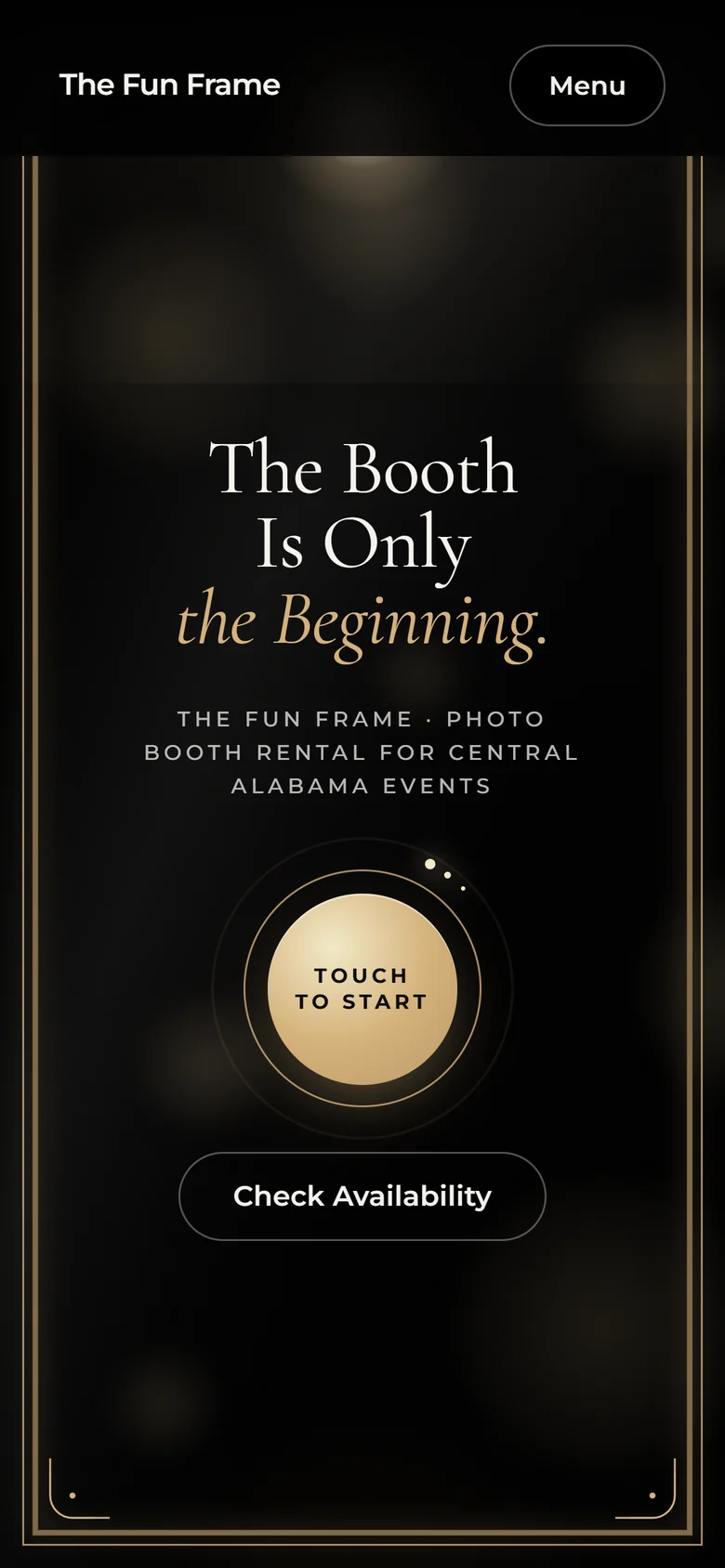
From desktop to phone
05 · Responsive behaviour
The hero reflows to a centred column with the booth button and availability action stacked beneath the headline. The header collapses to a Menu button.
06 · Annotated mobile captures
Menu
Navigation collapses to one button.
Headline reflowed
Centred and rebalanced for a narrow screen.
Touch to start
Large and easy to reach with a thumb.
Check Availability
Stays visible without scrolling.
Custom CRM · in development
The event-operations CRM follows each event from the first inquiry to the day it happens. It is built specifically for The Fun Frame and has been built and tested in development. It is not confirmed in production and is not yet live for customers.
Local development environment. The screens below were captured from an isolated local build using fictional sample data and simulated payments. They are not production, show no real customer, and no live payment details.
- 01Inquiries
- 02Customer and event records
- 03Proposals and packages
- 04Agreements
- 05E-signature
- 06Deposits, balances and payment status
- 07Equipment and event scheduling
- 08Event preparation tasks
- 09Follow-ups
- 10Owner dashboard
- 11Financial records, audit history and workflow controls
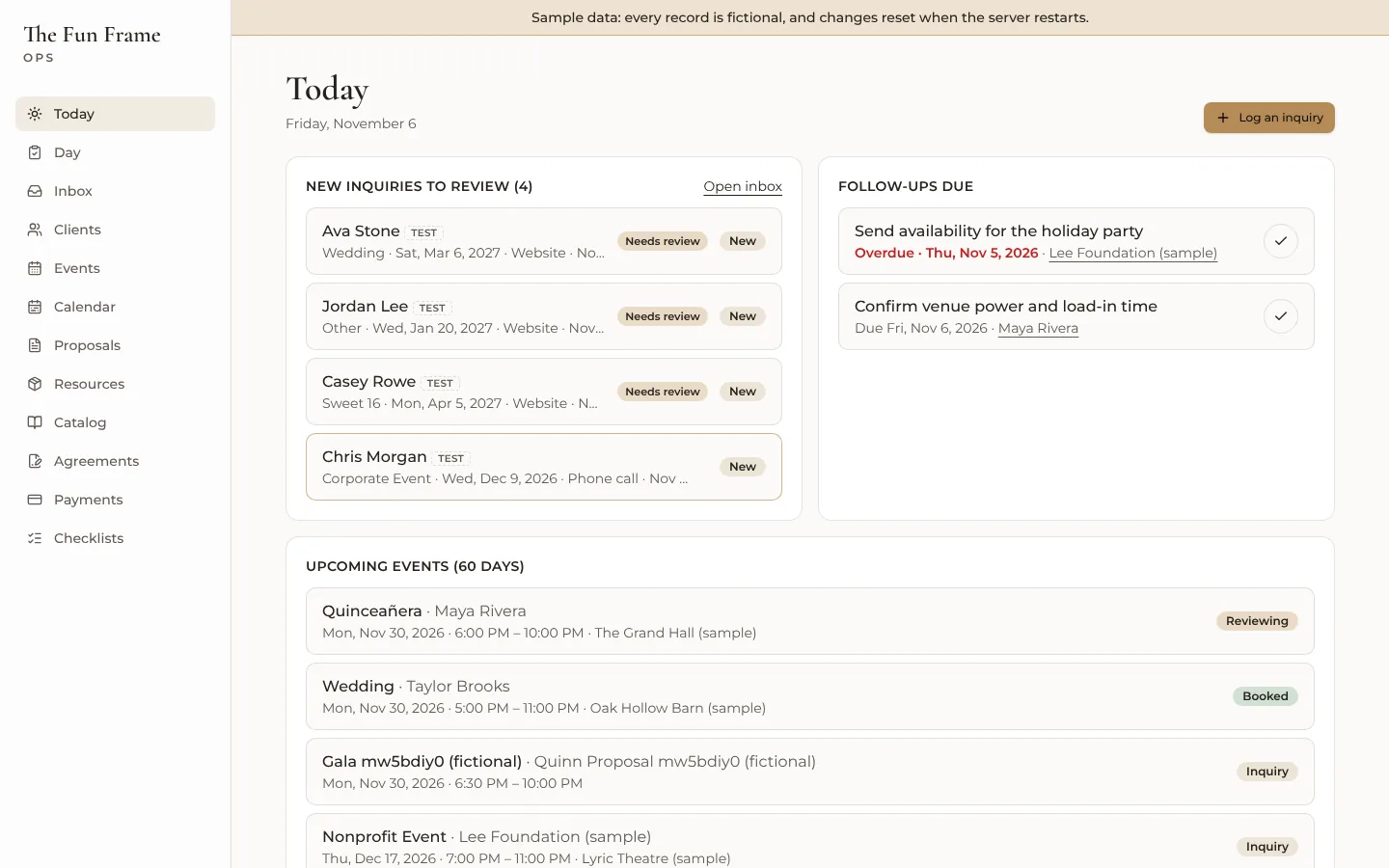
Fictional sample data
Every record in this capture is invented, and the screen says so.
Log an inquiry
A call or a conversation becomes a record in one click.
Inquiries to review
Website and hand-logged inquiries wait here until the owner looks at them.
Follow-ups due
Overdue follow-ups are flagged in red so nothing slips.
Upcoming events
The next sixty days, with the status of each event.
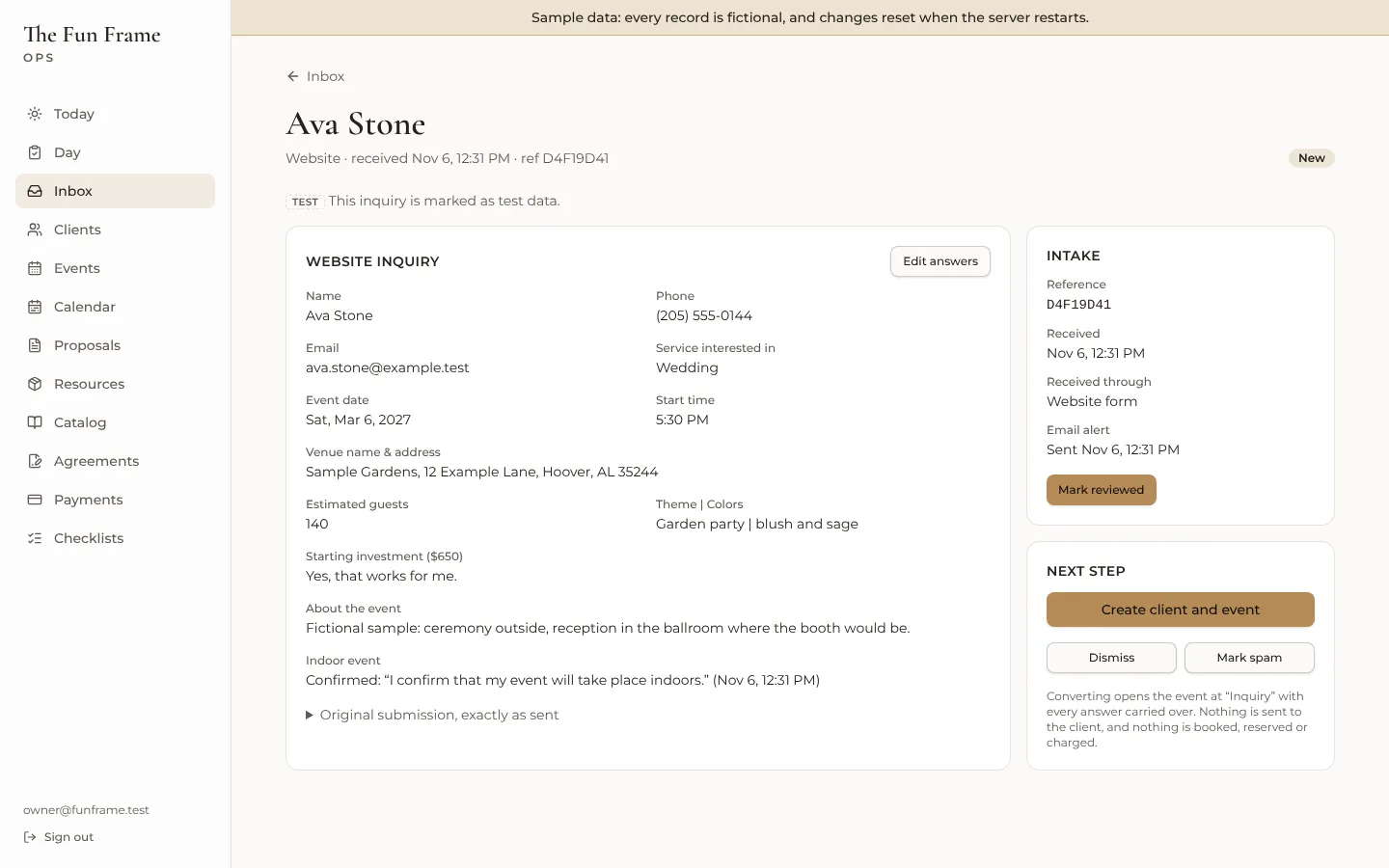
Marked as test data
Fictional records are labelled as such.
The whole inquiry
Date, venue, guests, theme and the customer's own words, kept together.
Intake record
Where it came from, when, and whether the owner's alert went out.
Convert on the owner's say-so
Nothing is sent, booked, reserved or charged until the owner converts it.
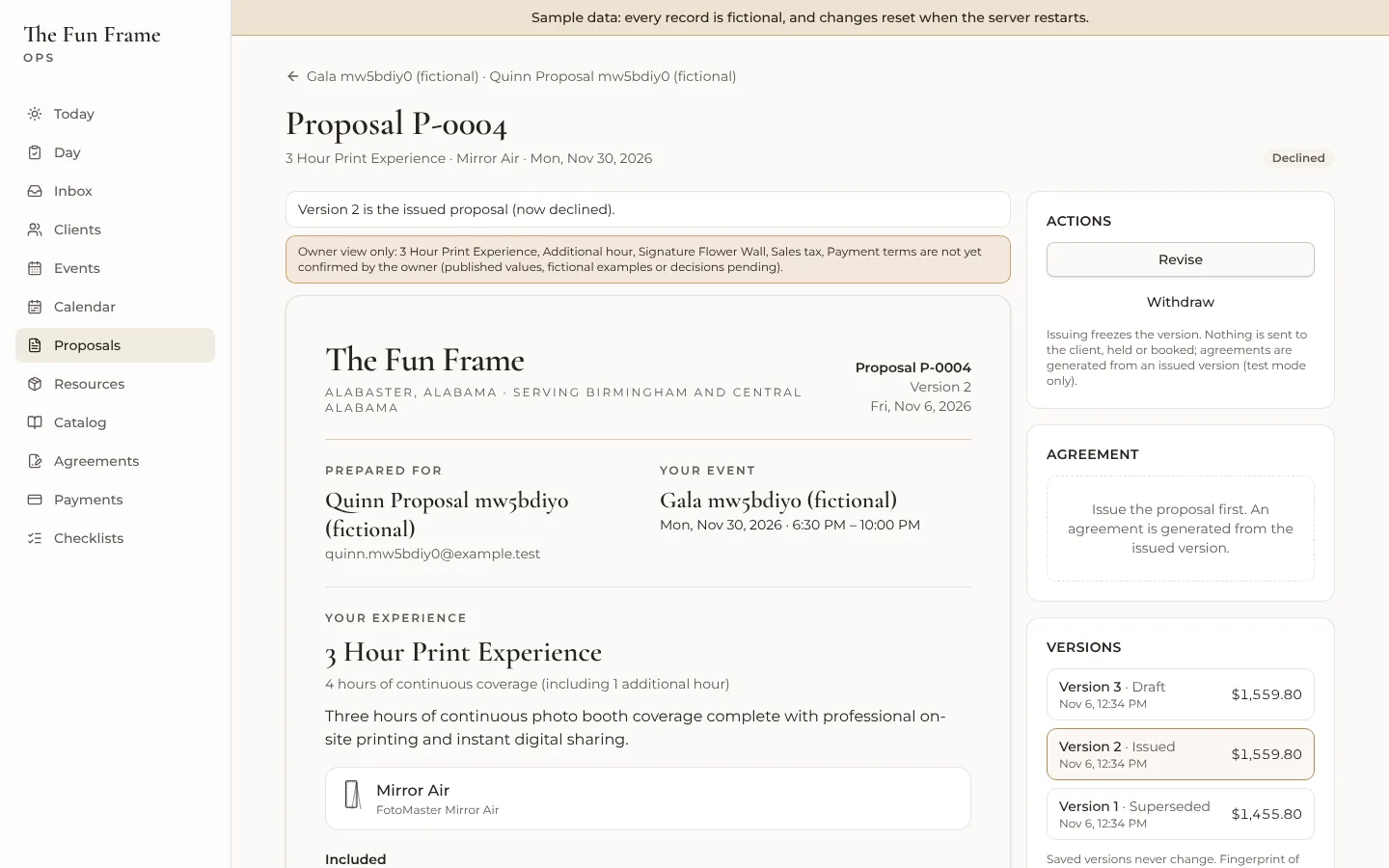
Revise or withdraw
Issuing freezes a version. Changes become a new version.
Honest owner notice
Anything not yet confirmed by the owner is flagged before it can reach a customer.
The customer's document
Package, booth and event as the customer will read them.
Versions never change
Draft, issued and superseded versions are all kept.
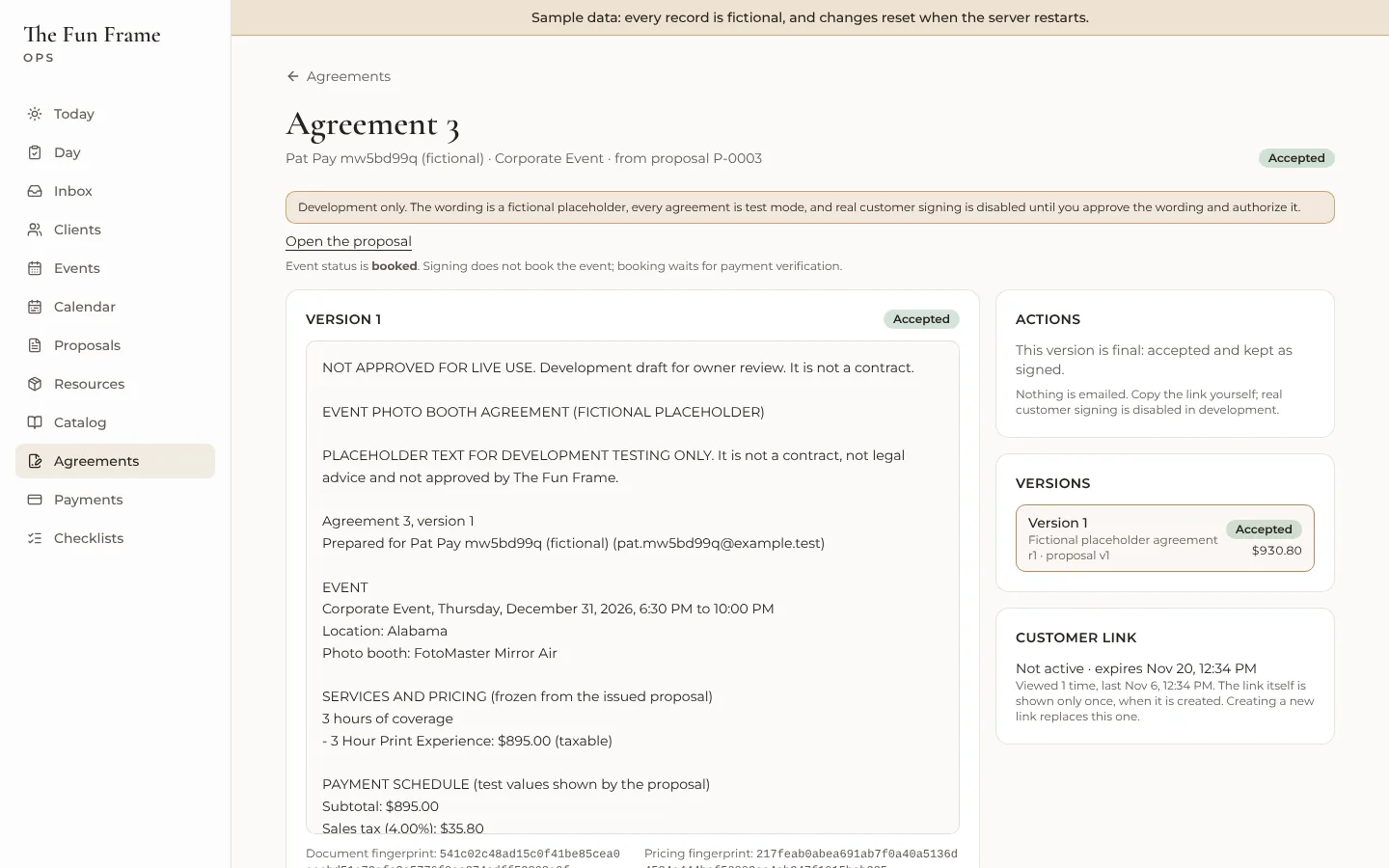
Development only
The wording is a placeholder and real signing is switched off until approved.
Signing is not booking
The event is booked only after payment is verified.
Frozen from the proposal
Services and pricing are copied from the issued version, with fingerprints.
Private customer link
Shown once, expires, and records how often it was viewed.
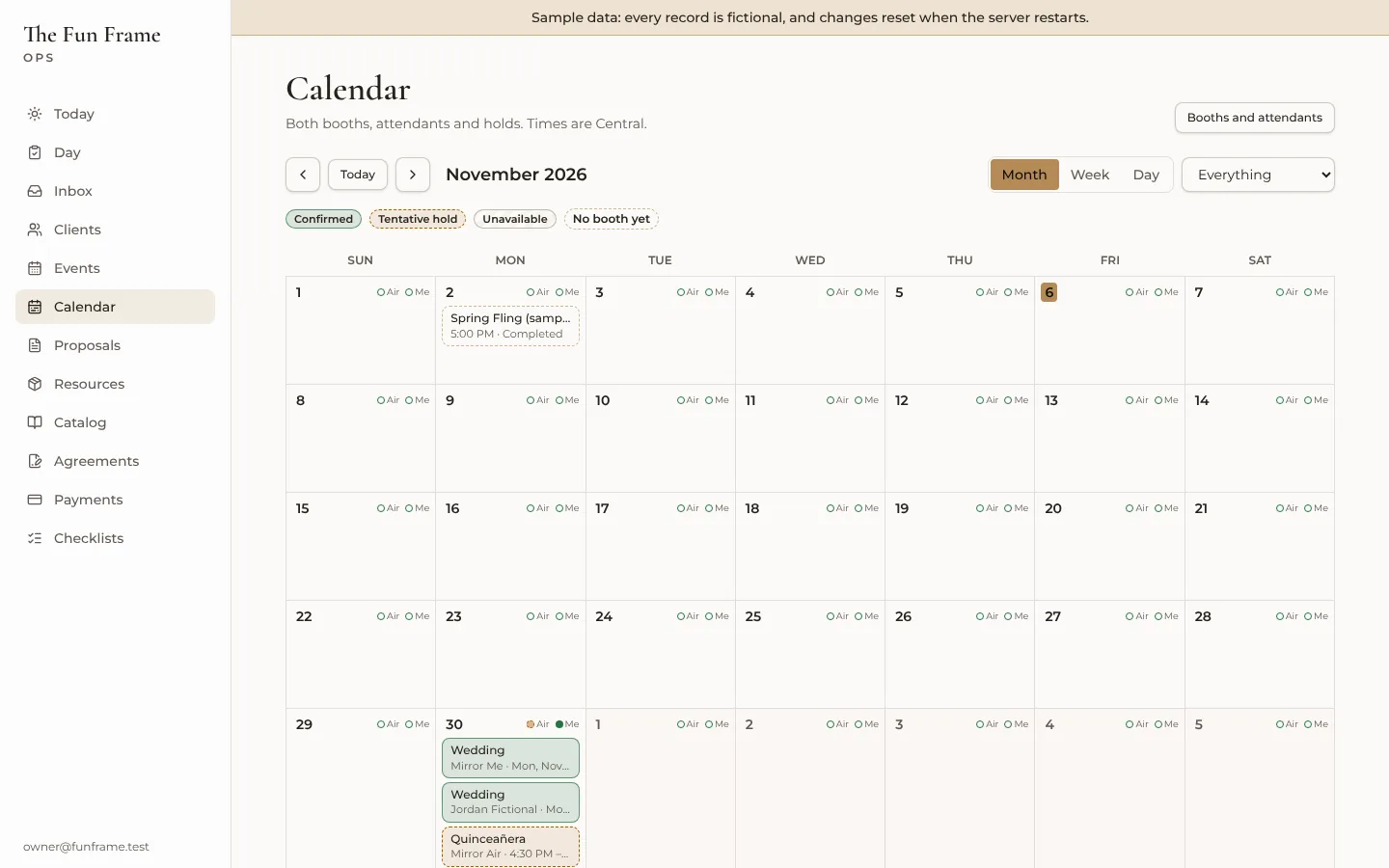
Month, week or day
The same schedule at the scale the owner needs.
Confirmed, tentative, unavailable
A tentative hold and a confirmed booking never look alike.
Each booth is its own unit
Mirror Air and Mirror Me show availability separately every day.
Holds and bookings
A booth held tentatively for one event cannot be double-booked.
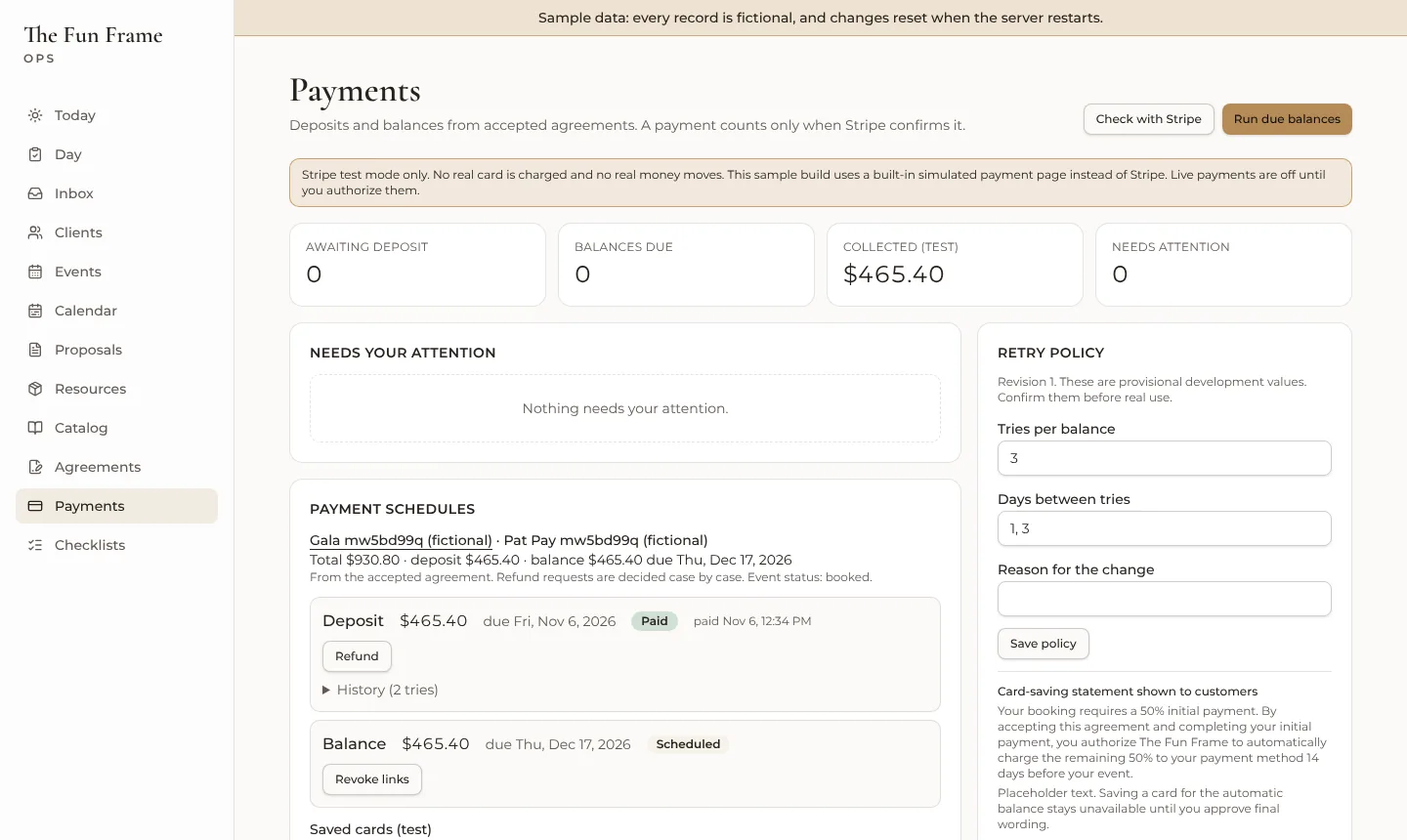
Test mode only
No real card is charged and no real money moves in this build.
Totals at a glance
Awaiting deposit, balances due, collected and needs attention.
Retry policy
How many times, and how far apart, a failed balance is retried.
Deposit and balance
A schedule created from the accepted agreement; a payment counts only when verified.
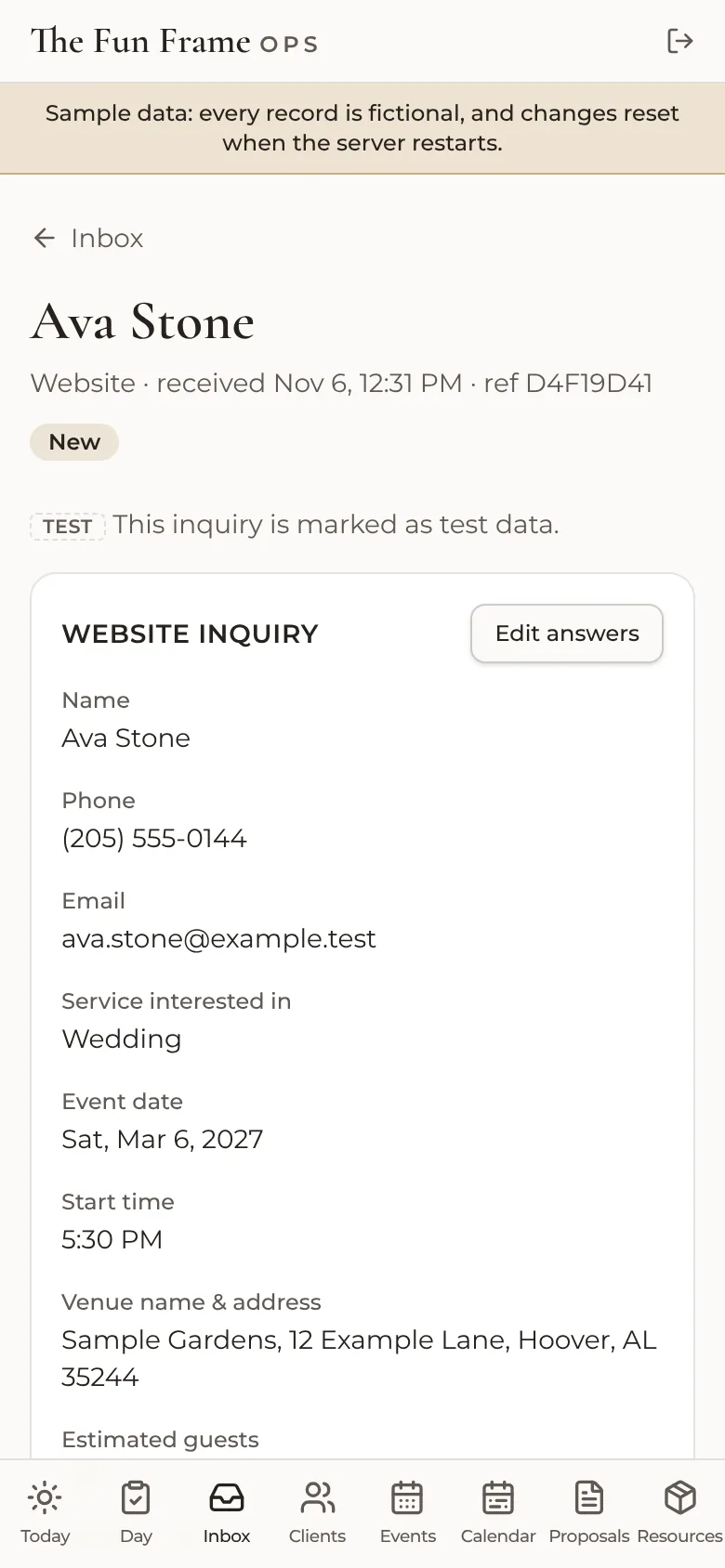
Sample-data banner
Stays visible on every screen.
Customer name first
Source and time received sit directly beneath it.
Inquiry details, one column
The same answers, stacked for a narrow screen.
Bottom navigation
The main areas stay a thumb away.
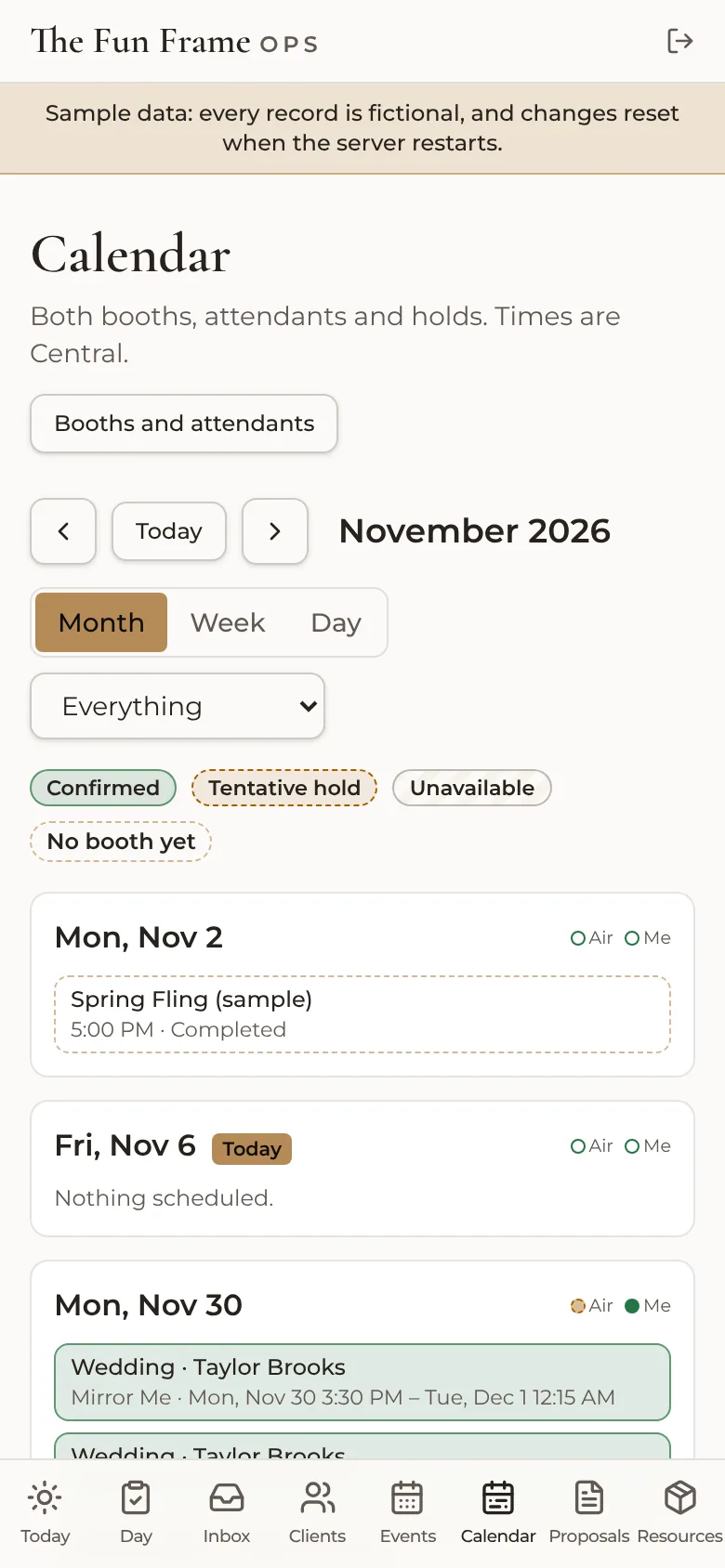
Month, week, day
The view switch is kept.
Legend
Confirmed, tentative, unavailable.
Days as cards
Each day lists its booth availability and its events.
Key functionality
- Operating website: mirror booth, portrait station, flower walls and event-type pages
- Check-availability call to action in the header on every page
- Full-screen menu organised by experiences, events and resources
- Serving-area section for Birmingham and Central Alabama
- Custom CRM (in development): see the capability list below
Key interactions
- A “Touch to start” booth button as the hero's entry point
- A full-screen menu overlay with three columns
- A long, single-page layout that tells the story section by section
Verified technical implementation
- Public website: a bundled single-page JavaScript build with analytics (verified from its published scripts).
- CRM: built for this business on the same stack as the STS platform, with owner-only sign-in, multi-factor authentication, row-level security, an audit log and immutable records. Its status is development, not production.
What it does
- Presents the mirror booth, portrait station and flower walls with event-type pages
- Puts a “Check Your Date” action in the header of every page
- Organizes the full-screen menu by experiences, events and resources
- Event-operations CRM covering inquiries, proposals, agreements, e-signature, payment status, scheduling, preparation tasks and an owner dashboard (in development)
Anything not marked is implemented in the version shown. Behavior marked demonstration, or in development, is not described as production-ready.
How it was built
- The public site was designed around the question a customer asks first: is my date free.
- The operations system was designed around how this business actually runs, rather than adapted from a generic booking tool.
Technology, as verified. Public website: a bundled single-page JavaScript build with analytics (verified from its published scripts); CRM: the same stack as the STS platform, with owner-only sign-in, multi-factor authentication, row-level security, an audit log and immutable records.
AI. AI-assisted engineering was used on the platform work, recorded in its commit history. It supported the architecture, testing and security decisions made by the team; it did not replace them.
Maturity. Website live. CRM built and tested in development, not confirmed in production and not live for customers.
Beyond this business
The transferable capability is a front door that answers the first question fast, backed by a system that carries one event from inquiry to delivery.
- DJs, bands and event entertainment. Date checking and package pages in front, with contract, deposit and set-list collection behind.
- Equipment and party-rental companies. Availability per item and per day, with delivery windows and preparation checklists.
- Photographers and videographers. Inquiry to proposal to signed agreement, with shoot-day tasks and gallery hand-off.
- Caterers and florists. Quote requests that capture headcount and venue, and a preparation timeline per event.
What Business Discovery would decide for a new business:
- Which steps from inquiry to event are really the bottleneck
- What must be signed, paid or confirmed before a date is held
- Whether a custom operations system is justified or an existing tool is enough
- How payments, taxes and customer records must be handled for that business
These are applications of the capability, not designs to select. A new site would be designed from that business's own answers.
07 · Business value
One system for the customer-facing website and the behind-the-scenes operation, built around how this specific business actually works rather than a generic booking tool.
Classification: Operating Business — Website & Custom CRM. Status: The website is live and operational. The custom event-operations CRM is built and tested in development; it is not confirmed in production and is not yet live for customers.
Your business
Simplified Tech Solutions does not build businesses around website templates. We design digital experiences around the business itself. Every project begins with Business Discovery: understanding what the business does, who it serves, how it operates, and what its digital experience must accomplish.
These concepts exist to demonstrate capability. A real project is not assembled from one of them; it begins with Business Discovery, and the design and engineering are decided from what that conversation finds. This page does not claim that any concept shown here began with a discovery session unless its own record says so.